

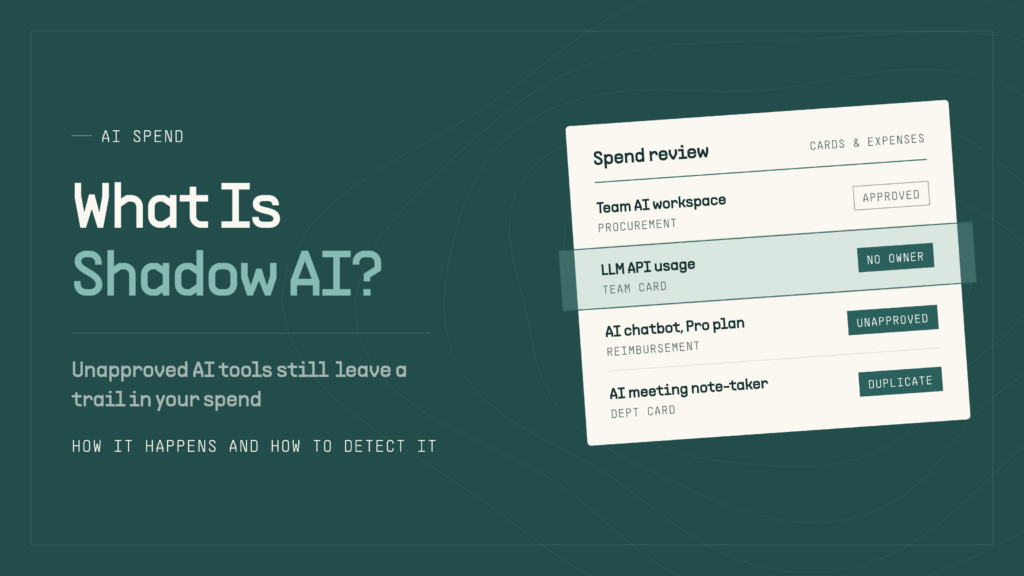
Shadow AI is the use of artificial intelligence tools or features inside an organization without approval or oversight from the IT, security, or finance departments. It covers everything from an employee pasting customer data into a personal chatbot account to an engineering team running a model API key on a card nobody else tracks.
Because most AI tools are cheap to start and billed per seat or per token, shadow AI spreads faster than traditional shadow IT, and it often appears in your spend data first. This guide covers how shadow AI happens, its risks, and how to detect it.
What Is Shadow AI?
Shadow AI refers to any AI tool, model, plugin, or AI-powered feature that employees use for work without the organization’s knowledge or approval. The tool itself is usually legitimate. What makes it “shadow” is the missing oversight: no security review, no data-handling agreement, no named owner, and no line in the budget.
Shadow AI usually falls into three categories:
- Standalone AI apps: Chatbots, writing assistants, image generators, and meeting note-takers used through personal or unapproved accounts.
- Embedded AI features: AI capabilities switched on inside software you already approved, such as a CRM, help desk, or design tool, without anyone reviewing how that feature handles your data.
- Unmanaged API usage: Model API keys from providers like OpenAI, Anthropic, or Google that a developer or team creates outside a governed account, often billed to a corporate card or expensed.
What Is Shadow GPT?
Shadow GPT is an informal term for unauthorized use of ChatGPT or other GPT-based tools at work. It usually means employees using personal ChatGPT accounts, custom GPTs, or GPT-powered browser extensions for company tasks outside approved channels. Shadow GPT is a subset of shadow AI and its most common form, since ChatGPT is often the first AI tool employees try.
Shadow AI vs. Shadow IT
Shadow IT is any hardware, software, or cloud service used without IT approval. Shadow AI is a subset of shadow IT, but it behaves differently in ways that make it harder to catch and more expensive to ignore.
| Factor | Shadow IT | Shadow AI |
|---|---|---|
| Typical example | Personal file-sharing account, unapproved project management app | Personal chatbot account, unmanaged API key, AI note-taker |
| Primary data risk | Company files are stored in unapproved locations | Company data is sent to third-party models that may retain it |
| Cost model | Mostly flat per-seat subscriptions | Seats plus usage-based token billing that can spike without warning |
| Time to adopt | Days to weeks | Minutes; many tools need only an email address |
| Visibility | Usually appears in SSO logs and SaaS inventories | Often hides in browser sessions, extensions, embedded features, and API calls |
Why Employees Use Unauthorized AI Tools
Most shadow AI isn’t malicious on its own. Employees adopt AI tools to work faster, and they skip approval because the approval path moves more slowly than the tool.
Common causes of shadow AI include:
- Productivity pressure: Teams face higher output targets and see AI as the fastest way to meet them.
- Slow or unclear procurement: A two-month security review loses to a free trial that works today.
- No approved alternative: If you haven’t sanctioned a tool for a common task, employees will pick their own.
- Unclear policy: Employees often don’t know which AI uses are allowed, so they assume all of them are.
- Default-on vendor features: SaaS vendors increasingly ship AI features turned on, creating shadow AI inside approved tools.
Common Examples of Shadow AI in the Workplace
Shadow AI looks different in every department, but almost every instance leaves a trace somewhere. The table below maps common examples to where you’re most likely to find them.
| Example | Common teams | Where it leaves a trace |
|---|---|---|
| Pasting customer emails, contracts, or code into a personal chatbot | Sales, support, legal, engineering | Network and DNS logs; rarely in spend if on a free tier |
| Paid chatbot subscriptions (ChatGPT, Claude, Gemini) on a card or expensed monthly | Any | Card transactions, expense reports, reimbursements |
| AI meeting note-taker joining calls | Sales, operations, leadership | OAuth grants, calendar access, meeting participant lists |
| AI browser extension summarizing emails or pages | Any | Endpoint and browser management, OAuth grants |
| Developer API key billed to a personal or team card | Engineering, data | Card transactions, provider invoices, API usage logs |
| AI add-ons enabled inside approved SaaS | Marketing, support, HR | Vendor admin settings, plan upgrades on invoices |
| Department buys an AI copy, image, or analytics tool | Marketing, finance, ops | Card transactions, gaps in the software inventory |
The pattern matters: paid AI almost always touches a card, an expense report, or an invoice, even when it avoids network monitoring entirely. That makes finance data one of the most underused shadow AI detection sources.
What Are the Risks of Shadow AI?
- Data exposure: Employees may share customer PII, financial data, source code, or strategy documents with models outside your control.
- Compliance gaps: Unreviewed tools can break contractual data-handling terms and privacy obligations such as GDPR, HIPAA, or SOC 2 commitments.
- Security vulnerabilities: Overly broad OAuth scopes, leaked API keys, and unvetted extensions widen your attack surface.
- Unreliable output: AI-generated content, code, or analysis can reach customers or decisions without review.
- Uncontrolled AI spend: Duplicate subscriptions, unowned API keys, and usage creep inflate costs. Token-based pricing compounds the problem, since issues like token count drift and prompt bloat raise bills without anyone noticing.
The security cost is measurable. According to IBM’s 2025 Cost of a Data Breach research, one in five organizations studied reported a breach tied to shadow AI, and those incidents added up to $670,000 to the average breach cost.
How To Detect Shadow AI in Your Organization
There is no single method that catches everything. Effective shadow AI detection will combine technical signals from IT and security with financial signals from finance.
Here are five places to look:
1. Review Network Activity
- Pull DNS, proxy, firewall, and secure web gateway logs for traffic to AI domains and model API endpoints.
- Use a cloud access security broker (CASB) or security service edge (SSE) platform to categorize generative AI traffic.
- Look at upload volume, not just visits. Large or frequent uploads suggest employees are sharing files or data.
- Blind spots: Personal devices, remote work off the corporate network, and AI embedded in apps you already allow.
2. Audit SaaS and OAuth Connections
- Review third-party app access in your Google Workspace or Microsoft 365 admin console for AI apps connected to email, calendars, or file storage.
- Check SSO and identity logs for new sign-ups using corporate email addresses.
- Inventory browser extensions and check approved SaaS admin settings for active AI features.
3. Track AI and API Usage
- List every API key across OpenAI, Anthropic, Google, and other model providers. Flag keys with no owner, no tag, or no recent rotation.
- Review provider consoles for workspaces or projects you don’t recognize.
- Watch for off-hours spikes and stale credentials that are still generating charges.
- Compare actual usage against approved use cases. For a deeper framework, see how to track, audit, and reduce LLM spending.
4. Reconcile Software Inventories
- Compare your SaaS management or IT asset inventory against what your company actually pays for.
- Treat any AI vendor that appears in payments but not in the inventory as a shadow AI candidate.
- Ask department heads to self-report AI tools, and make it clear the goal is visibility, not punishment.
5. Review Company Expenses for AI Spend
Spend data is one of the most reliable ways to detect shadow AI because paid tools have to get paid for. Even when a tool bypasses network monitoring, the card charge or reimbursement request still lands in your books. Look for:
- Recurring AI subscriptions: Monthly charges from AI vendors on corporate cards, especially individual-tier plans.
- Employee reimbursements: AI tools submitted under vague categories like “software,” “research,” or “subscriptions.”
- Departmental purchases: Teams buying AI tools on department cards without going through procurement.
- Unexpected API or model charges: Usage-based bills that grow month over month or spike without a matching project.
- Duplicate AI tools: Multiple teams paying for overlapping tools, or several individual seats where one team plan would do.
Search transaction descriptors for AI vendor names and keywords like “AI,” “GPT,” and “LLM.” Centralized expense management makes this much faster because receipts and card charges get coded to a category at the point of purchase instead of at month-end.
Tools and Techniques for Detecting Shadow AI
Each detection method covers a different slice of shadow AI. Mapping them side by side shows where your gaps are.
| Method | What it catches | Common blind spot | Typical owner |
|---|---|---|---|
| Network and DNS monitoring | Browser use of AI sites and API endpoints | Personal devices, off-network use, embedded features | IT / Security |
| CASB or SSE | Categorized gen AI traffic and uploads | Unmanaged devices | Security |
| OAuth and SSO review | AI apps with access to company data | Tools used without a corporate login | IT |
| API key and usage review | Unowned keys, unknown workspaces, spikes | Accounts you don’t know exist | Engineering / Platform |
| Software inventory | Tools bought through procurement | Anything bought outside procurement | IT / Procurement |
| Spend and expense review | Paid subscriptions, reimbursements, API bills, duplicates | Free-tier usage | Finance |
Free-tier usage is the one gap spend data can’t close. That’s why the strongest programs typically pair a finance review with network and OAuth monitoring.
Graphic Opportunity: Coverage heatmap: six detection methods vs. three shadow AI categories (standalone apps, embedded features, API usage).
How To Reduce Shadow AI Risk
Detection finds what’s already there. These steps keep new shadow AI from piling up:
- Build an AI inventory. Record every AI tool, feature, and API key in use, along with its owner, the data it touches, and what it costs.
- Publish an approved tools list. Cover the most common use cases, like writing, summarizing, coding, and meeting notes, and make the approved path faster than the workaround.
- Write an AI acceptable use policy. Define which data classes employees can share with AI, which accounts they must use, and when AI-generated work needs disclosure or review.
- Monitor continuously. Route AI purchases to designated cards with category controls, and alert on new AI merchants and API spend spikes. Card-level spend management controls help enforce this at the point of sale.
- Audit regularly. Reconcile network, OAuth, API, and spend data at least quarterly. Frameworks like the NIST AI Risk Management Framework provide a useful structure for ongoing governance.
Graphic Opportunity: Five-step workflow graphic: Inventory > Approve > Policy > Monitor > Audit, looping back to Inventory.
FAQs
What is the use of shadow AI?
Employees use shadow AI for the same tasks as approved AI: drafting emails and documents, summarizing meetings, writing and debugging code, analyzing data, and creating images. The work itself is often legitimate. The problem is that it happens without security review, data controls, or cost oversight.
How can an organization detect shadow AI?
Combine network logs, SaaS and OAuth reviews, API usage data, software inventories, and expense data. Technical monitoring catches free-tier use; spend data catches paid tools that bypass the network.
Is shadow AI always a problem?
Not always. Shadow AI can signal real demand for tools your organization hasn’t provided yet. Treat discovery as a chance to learn which tools employees need, then bring the useful ones under approved accounts and policies.
How does Dash.fi help find shadow AI?
Dash.fi puts card transactions, expense reports, and bill pay in one platform, so recurring AI subscriptions, reimbursements, departmental purchases, unexpected API charges, and duplicate tools show up in one place.
For API spend, the Dash.fi AI Spend Audit connects to Anthropic and OpenAI with read-only admin keys and flags untagged keys with no owner, stale credentials that are still spending, off-hours bursts, and workspaces taking an outsized share of spend. It doesn’t replace network or OAuth monitoring, but it does cover the paid side of shadow AI that security tools often miss.